Coming soon — join the waitlist

Put your view live on YouTube. Just plug it in.

A weatherproof camera that streams your view straight to YouTube, 24/7. Plug it into a network socket, open the control panel in your browser, and you're live — no computer, no encoder, no software to run.

Join the Waitlist £299 one-off · no subscription
Union Jack Designed & Assembled in Great Britain
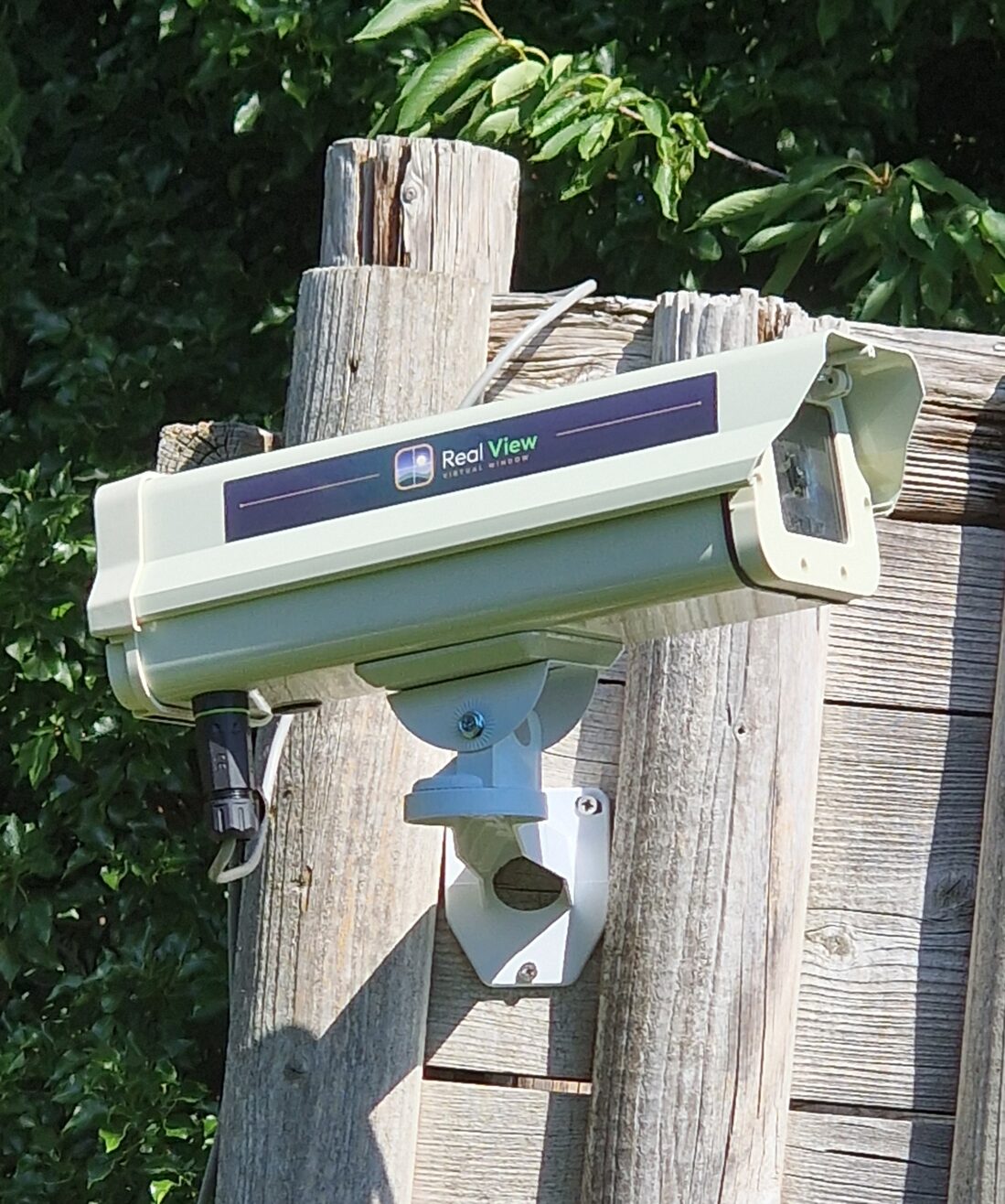
The StreamingCams weatherproof camera installed outdoors, streaming a live view
LIVE on YouTube
The Union Jack, the flag of Great Britain

Made with pride

Designed & Assembled in Great Britain

Every camera is designed and hand-assembled right here in Great Britain — never mass-produced overseas. British-built quality, British support, and a real person to talk to when you need one.

One camera, one cable, live in minutes

A live stream without the studio

Getting a permanent live stream onto YouTube usually means a spare PC, streaming software, an encoder and a lot of fiddling. This is one camera. It goes online the moment you plug it in, and everything else happens in an easy web control panel you open in any browser. Point it at a view worth watching — the coast, a harbour, a high street, a nature reserve, your yard — and leave it running.

What it does

Everything, from one little camera

No add-ons, no extra boxes. It's all built in.

▶️

Streams straight to YouTube

Connect your YouTube channel once in the control panel and your view goes live — a permanent 24/7 stream that keeps you visible and searchable.

🖥️

Set it up in your browser

An easy web control panel does the whole setup — pick your channel, aim the view, hit go live. Nothing to install on your computer or phone.

🔌

One cable does it all

A single network cable carries both power and internet (PoE). Plug it in and the camera finds itself and comes online on its own — no separate power lead.

📵

No PC, no encoder, no OBS

The camera does the streaming itself. No spare computer humming in a cupboard, no encoder box, no streaming software to keep running.

🌩

Built for outdoors

A rugged, weatherproof enclosure means it lives outside pointed at the view — rain, sun or frost — and just keeps streaming.

🔇

No microphone

It's made for views, so there's no microphone and no audio at all — nothing anyone says near it is ever captured. A view camera, not a listening device.

How it works

Three steps. You do one of them.

From box to live stream in a few minutes.

1

Plug it in

Mount the camera where it sees the view and connect one network cable. That cable powers it and gets it online at the same time, so it wakes up and connects by itself.

2

Open the control panel

In any web browser, sign in and link your YouTube channel. Frame the shot, give the stream a name, and you're ready — no software to download, nothing technical to configure.

3

You're live

Hit go live and your view is streaming to YouTube around the clock. Leave it running; check in or re-aim any time from the same browser panel.

Pricing

One price. No subscription.

Buy the camera once and it's yours. Streaming to your own YouTube channel is free — that's YouTube's side, not ours — so there are no monthly fees to run it.

£299
One-off · no subscription

The camera, ready to plug in.

  • Weatherproof plug-and-play camera
  • Streams live to your YouTube channel
  • Easy web control panel — setup in your browser
  • Powered over one network cable (PoE)
  • No microphone — view only
  • No monthly fees, ever
Join the Waitlist

Launching soon. Waitlist members get first units and early-bird pricing.

Want more than YouTube? Add Real View.

You don't need anything but YouTube — but if you'd like to, the same control panel can also connect your camera to Real View, a TV app where people watch beautiful live views on their televisions. Flip it on if you want the extra audience; leave it off and it's simply a YouTube camera. Entirely optional.

Questions

Good to know

Do I need a computer or streaming software?
No. The camera streams to YouTube by itself. There's no PC to leave running, no encoder box, and nothing like OBS to set up. Everything you do is in a web control panel you open in an ordinary browser.
How does it get power and internet?
One network cable does both, using PoE (Power over Ethernet). Plug that single cable into the camera and it gets power and internet together, then comes online on its own. If the socket you're running to doesn't supply power, a small PoE injector (we can include one) adds it to an ordinary cable run.
Do I need my own YouTube channel?
Yes — a free YouTube channel is all it takes. You link it once in the control panel and the camera streams to it. Streaming to your own channel doesn't cost anything; that's on YouTube's side.
Is there really no monthly fee?
Correct — the camera is a one-off purchase and streaming to your own YouTube channel is free. There's no subscription to keep it running.
Does it record sound?
No. It's built for views and has no microphone at all, so there's no audio and nothing anyone says near it is ever captured. Point it at the scenery rather than at people and there's nothing to think twice about.
Can it go outside?
Yes. It comes in a rugged, weatherproof enclosure made to live outdoors pointed at the view, through rain, sun and frost.
What can I point it at?
Anything worth watching — a coastline or harbour, a high street, a nature reserve or bird feeder, a building site, a ski slope, your garden or yard. If it makes a good live view, it's a good fit.
Can it also appear somewhere other than YouTube?
If you want. The same control panel can optionally connect your camera to Real View, a TV app for live views, for extra audience. It's completely optional — on its own the camera is simply a YouTube streaming camera.

Join the waitlist

Be first in line

Leave your details and we'll email you the moment the camera is available — waitlist members get the first units and early-bird pricing.